Working from home becomes much easier when you have enough screen space. Although a laptop is convenient, its smaller display can feel restrictive when you work with spreadsheets, documents, emails, browser tabs, or online meetings.
Fortunately, you don’t need an expensive monitor to improve your home-office setup. Several good Full HD monitors are available for less than ₹10,000 in India.
In this guide, we’ll look at some of the best monitors for work from home under ₹10,000. We’ll also explain the important features you should consider before buying one.
Affiliate Disclosure: This article may contain affiliate links. If you purchase through these links, Arunova.net may earn a commission at no additional cost to you. Prices and availability can change, so always check the latest price before purchasing.
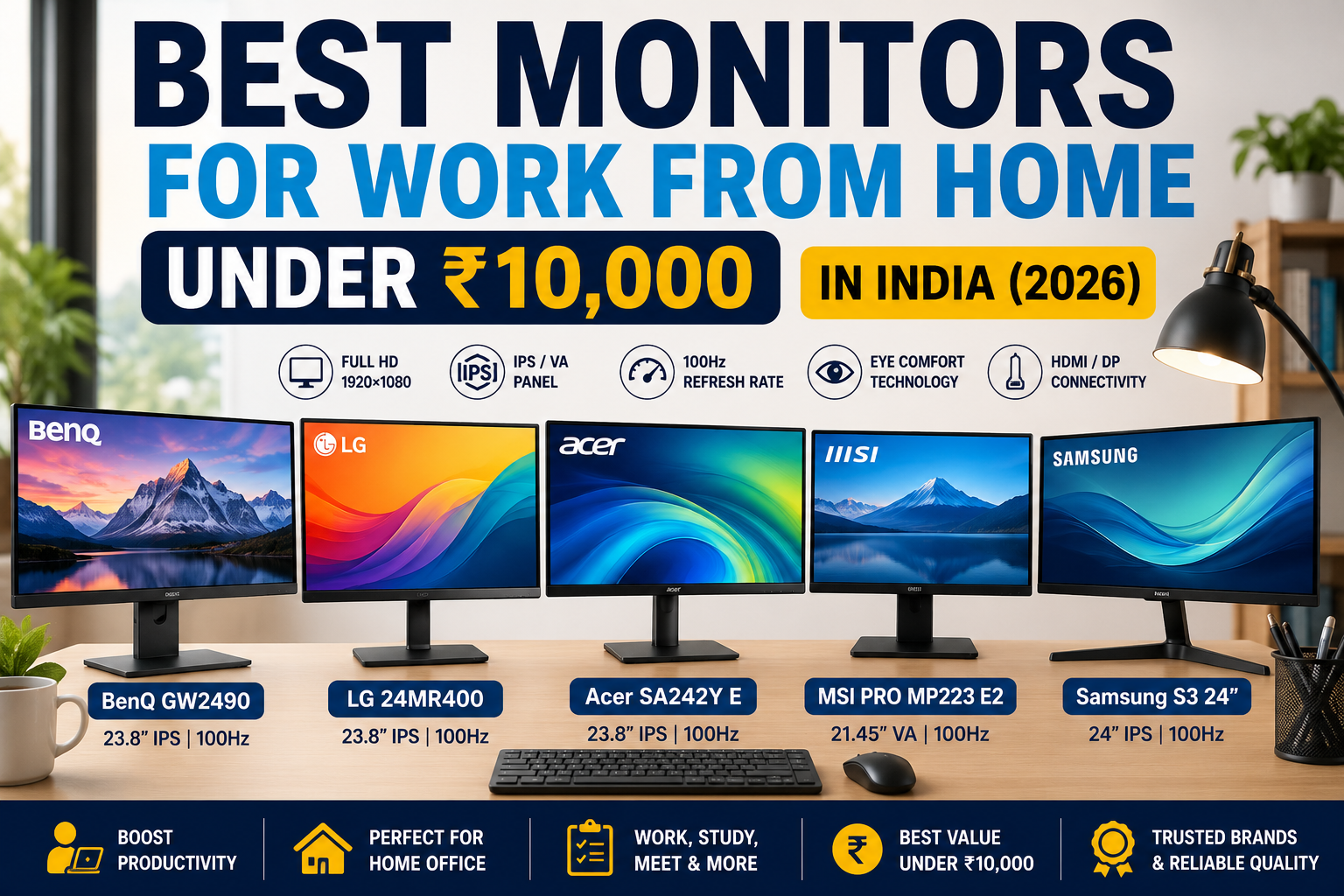
Quick Comparison: Best Monitors Under ₹10,000
| Monitor | Screen Size | Resolution | Panel | Refresh Rate | Best For |
|---|---|---|---|---|---|
| BenQ GW2490 | 23.8″ | Full HD | IPS | 100Hz | Best Overall |
| LG 24MR400 | 23.8″ | Full HD | IPS | Up to 100Hz | Everyday Office Work |
| Acer SA242Y E | 23.8″ | Full HD | IPS | 100Hz | Best Value |
| MSI PRO MP223 E2 | 21.45″ | Full HD | VA | 100Hz | Budget Office Setup |
| Samsung S3 24″ | 24″ class | Full HD | IPS | 100Hz | Clean Home Office Setup |
Specifications and availability may vary by exact model or seller. Always verify the product listing before ordering.
1. BenQ GW2490 – Best Overall for Work From Home
The BenQ GW2490 is an excellent all-round choice for a home office. Its 23.8-inch Full HD IPS display provides enough workspace for documents, spreadsheets, web browsing, and online meetings.
In addition, the monitor supports a 100Hz refresh rate. As a result, scrolling through documents and websites can appear smoother than on a traditional 60Hz display.
BenQ also includes several eye-comfort features. These include Flicker-Free technology, Low Blue Light Plus, Brightness Intelligence Gen2, and Eye-CareU support.
Another advantage is connectivity. The GW2490 provides two HDMI ports and one DisplayPort, which is particularly useful if you want to connect more than one device.
Key Features
- 23.8-inch IPS display
- Full HD 1920 × 1080 resolution
- 100Hz refresh rate
- 99% sRGB coverage
- 250-nit typical brightness
- Dual HDMI
- DisplayPort
- Built-in 2W × 2 speakers
- Headphone jack
- Flicker-Free technology
- Low Blue Light
- Brightness Intelligence Gen2
- 100 × 100 mm VESA mount support
Why We Like It
The GW2490 combines display quality, useful connectivity, eye-comfort features, and built-in speakers in one affordable package.
Moreover, the IPS panel provides wide viewing angles, while the 100Hz refresh rate makes everyday movement and scrolling feel smoother.
Best For
Office professionals, long working hours, productivity, spreadsheets, browsing, online meetings, and general home-office use.
Check Latest Price on Amazon
2. LG 24MR400 – Best for Everyday Office Work
The LG 24MR400 is another strong option for a work-from-home desk.
It features a 23.8-inch IPS Full HD display. Therefore, text, spreadsheets, presentations, websites, and videos have plenty of usable screen space without requiring a very large desk.
IPS technology also provides wide viewing angles. This can be helpful when you occasionally share your screen with someone sitting beside you.
Furthermore, LG includes Reader Mode and Flicker Safe features to improve comfort during longer working sessions.
AMD FreeSync is another useful addition. While it is mainly associated with smoother visual performance, it adds extra versatility if you occasionally use the monitor for entertainment after work.
Key Features
- 23.8-inch IPS display
- Full HD 1920 × 1080 resolution
- Up to 100Hz refresh rate through supported input
- AMD FreeSync
- Reader Mode
- Flicker Safe
- HDMI connectivity
- D-Sub/VGA connectivity
- Headphone output
- Wide viewing angles
- Slim, modern design
Why We Like It
The LG 24MR400 focuses on the features most home-office users actually need: a good-sized IPS screen, Full HD resolution, smooth refresh rate, and eye-comfort features.
In addition, its simple design should fit comfortably into most home-office setups.
Best For
General office work, students, web browsing, documents, online classes, and everyday productivity.
Check Latest Price on Amazon
3. Acer SA242Y E – Best Value for Money
If you want to spend less while still getting a 23.8-inch Full HD IPS monitor, the Acer SA242Y E deserves consideration.
Its Full HD resolution is suitable for everyday productivity. More importantly, the 23.8-inch screen provides considerably more workspace than a typical laptop display.
The monitor also supports a 100Hz refresh rate. Consequently, scrolling and everyday movement can appear smoother.
Acer’s ZeroFrame-style design gives the monitor relatively slim borders. Therefore, it can also work well if you plan to create a dual-monitor setup later.
Key Features
- 23.8-inch IPS display
- Full HD resolution
- 100Hz refresh rate
- 1ms VRB response specification
- AMD FreeSync
- ZeroFrame design
- VisionCare features
- HDMI
- VGA
- VESA mounting support
Why We Like It
Value is the biggest attraction.
You get a Full HD IPS panel, a 100Hz refresh rate, and a 23.8-inch screen at a relatively affordable price. Therefore, it can be a smart choice for someone building a home office on a limited budget.
Best For
Budget home offices, students, first-time monitor buyers, and dual-monitor setups.
Check Latest Price on Amazon
4. MSI PRO MP223 E2 – Best Compact Budget Monitor
Not everyone has enough desk space for a 24-inch display. In that situation, the MSI PRO MP223 E2 can be an interesting alternative.
The monitor uses a 21.45-inch Full HD VA panel. Although it is smaller than the 23.8-inch models above, you still get a 1920 × 1080 resolution.
Another advantage is its 100Hz refresh rate. In addition, MSI specifies a 3000:1 contrast ratio, which is one of the strengths of its VA panel.
The display also has an anti-glare surface. Therefore, reflections may be less distracting in brightly lit rooms.
Key Features
- 21.45-inch VA panel
- Full HD 1920 × 1080 resolution
- 100Hz refresh rate
- 3000:1 contrast ratio
- Anti-glare display
- Adaptive-Sync
- HDMI
- DisplayPort
- Headphone output
- 75 × 75 mm VESA mounting
- Tilt adjustment
- 250-nit brightness
Why We Like It
The MSI PRO MP223 E2 provides Full HD resolution and 100Hz performance without taking up too much desk space.
Furthermore, its high contrast ratio can produce deeper-looking dark areas compared with many basic IPS office monitors.
Best For
Small desks, students, basic office work, secondary-monitor setups, and budget-conscious buyers.
Check Latest Price on Amazon
5. Samsung S3 24-inch Full HD Monitor – Best for a Clean Office Setup
The Samsung S3 24-inch Full HD monitor is another option worth checking when shopping below ₹10,000.
Selected current S3 models combine a 24-inch-class Full HD display with an IPS panel and a 100Hz refresh rate.
The borderless-style design also gives the monitor a clean appearance. As a result, it can fit nicely into a modern work-from-home desk.
Key Features
- 24-inch-class display
- Full HD resolution
- IPS panel
- 100Hz refresh rate
- Borderless-style design
- Suitable for everyday productivity
- HDMI connectivity on compatible model
Why We Like It
Samsung combines a simple design with the basic specifications most home-office users need.
Additionally, the 100Hz refresh rate is a welcome upgrade over older 60Hz office monitors.
Best For
Home-office users who want a simple, modern monitor for everyday productivity.
Check Latest Price on Amazon
Which Monitor Should You Buy?
Your ideal monitor depends on your work and budget.
Choose BenQ GW2490 if:
You want the best overall work-from-home monitor in this list. Its IPS panel, 100Hz refresh rate, multiple ports, eye-care features, and built-in speakers make it particularly versatile.
Choose LG 24MR400 if:
You want a dependable 23.8-inch IPS monitor for documents, browsing, spreadsheets, and everyday office work.
Choose Acer SA242Y E if:
Getting maximum value for your budget is the priority. It offers an IPS Full HD screen and 100Hz refresh rate at an attractive price.
Choose MSI PRO MP223 E2 if:
Your desk is small or you want a compact Full HD secondary monitor.
Choose Samsung S3 if:
You prefer a simple 24-inch Full HD monitor with a clean design for your home-office desk.
What to Look for When Buying a Work-From-Home Monitor
A monitor’s specifications can look complicated at first. However, only a few features are especially important for ordinary office work.
1. Screen Size
For most work-from-home users, 23.8 or 24 inches is an excellent starting point.
This size gives you enough room for spreadsheets, documents, browser windows, and video meetings without occupying too much desk space.
A 21.5-inch monitor can still work well if your desk is small. On the other hand, users who frequently work with multiple windows may prefer a 24-inch or larger display.
2. Full HD Resolution
At this budget, 1920 × 1080 Full HD is the practical choice.
Full HD provides enough detail for office applications, browsing, videos, online classes, and everyday productivity.
Moreover, it works particularly well on 22-to-24-inch screens.
3. IPS vs VA Panel
Both panel types can be suitable for office work.
IPS Panel
IPS displays generally provide wide viewing angles and consistent colours. Therefore, they are excellent for general productivity and everyday use.
VA Panel
VA panels typically offer stronger contrast. As a result, dark areas can appear deeper.
For most work-from-home users, either panel technology can work well. However, IPS is often the easier all-round recommendation.
4. Refresh Rate
Older office monitors commonly operate at 60Hz. However, many affordable monitors now offer 100Hz.
A higher refresh rate doesn’t make your computer faster. Nevertheless, cursor movement, scrolling, animations, and general motion can look smoother.
For office work in 2026, a 100Hz monitor is worth considering when the price difference is small.
5. HDMI and DisplayPort
Before buying, check the ports on both your computer and the monitor.
HDMI is the most common choice for modern laptops and desktops. Meanwhile, DisplayPort can be useful for desktop computers and more flexible multi-monitor configurations.
Some budget monitors also include VGA. However, HDMI or DisplayPort should generally be preferred when available.
6. Eye-Comfort Features
Working in front of a screen for several hours can become tiring.
Therefore, features such as flicker reduction, low-blue-light modes, anti-glare coatings, and automatic brightness adjustment can be useful.
However, no monitor feature replaces sensible working habits. Take regular breaks and maintain a comfortable viewing distance.
7. VESA Mount Support
VESA compatibility lets you attach the monitor to a compatible monitor arm or wall mount.
This may not seem important initially. However, a monitor arm can free up valuable desk space and make it easier to adjust your screen position.
Therefore, VESA support is worth considering if you plan to improve your workspace later.
Is a 24-inch Monitor Good for Work From Home?
Yes. In fact, a 24-inch Full HD monitor is one of the most practical choices for a typical home office.
It provides significantly more workspace than most laptop screens. At the same time, it doesn’t require the desk space of a 27-inch or larger monitor.
For example, you can keep a document open on one side while viewing a website or reference material on the other.
Furthermore, connecting your laptop to an external monitor allows you to use both displays together. This creates a simple dual-screen workspace without purchasing two separate monitors.
Is 100Hz Necessary for Office Work?
No. You can work comfortably on a 60Hz monitor.
However, 100Hz displays are becoming increasingly affordable. Therefore, choosing 100Hz makes sense when it is available within the same budget.
Scrolling through long web pages can feel smoother. Similarly, cursor movement and interface animations appear more fluid.
For this reason, we consider 100Hz a useful bonus rather than an essential requirement.
Do You Need a 4K Monitor for Work From Home?
For most users shopping below ₹10,000, no.
A Full HD monitor is sufficient for email, Word documents, spreadsheets, browsing, video meetings, online classes, and general office applications.
Meanwhile, 4K becomes more useful for professional photo editing, video production, detailed creative work, or users who specifically want very high pixel density.
Therefore, a good Full HD IPS monitor usually provides better value for a budget home-office setup.
Can You Connect a Monitor to a Laptop?
Yes. Most modern laptops can connect to an external monitor.
HDMI is one of the easiest methods. Simply connect a compatible HDMI cable between your laptop and monitor.
Some laptops, however, provide video output through USB-C instead. In that case, you may need a compatible USB-C-to-HDMI adapter, USB-C hub, or docking station.
Before buying your monitor, check which video-output ports your laptop provides.
Single Monitor vs Dual Monitors for Work From Home
One external monitor is enough for many people. However, two displays can improve productivity for certain types of work.
For example, you can keep a spreadsheet on one monitor while viewing emails or reference material on another.
Similarly, during a video meeting, one screen can display the call while the second holds your notes or presentation.
If you expect to build a dual-monitor setup later, look for thin bezels and VESA mounting support.
How to Set Up Your Monitor for Comfortable Working
Buying the right monitor is only the first step. Proper positioning is equally important.
First, place the screen directly in front of your normal sitting position. This reduces the need to constantly turn your neck.
Next, adjust the display so that the top portion of the screen is around eye level or slightly below it.
In addition, avoid placing the monitor where strong window reflections fall directly on the screen.
Finally, adjust brightness according to your room. An extremely bright screen in a dark room can be uncomfortable during long working sessions.
Common Mistakes When Buying a Budget Monitor
Choosing Only by Screen Size
A larger monitor isn’t automatically better. Resolution, panel quality, ports, refresh rate, and viewing distance also matter.
Ignoring Laptop Connectivity
Always check your laptop’s ports before ordering. Otherwise, you may discover that an additional adapter is required.
Buying HD Instead of Full HD
Some inexpensive monitors still use lower resolutions. Therefore, check specifically for 1920 × 1080 Full HD when shopping in this price range.
Ignoring the Panel Type
IPS and VA panels behave differently. Understanding the basic differences will help you choose according to your work.
Paying Extra Only for Gaming Features
A home-office monitor doesn’t need extreme refresh rates or gaming-focused features. Instead, prioritize screen quality, connectivity, comfort, and reliability.
Forgetting About VESA Support
You may not need a monitor arm today. Nevertheless, VESA compatibility gives you more flexibility if your desk setup changes later.
Frequently Asked Questions
Which is the best monitor under ₹10,000 for work from home?
The BenQ GW2490 is our best overall choice because it combines a 23.8-inch Full HD IPS panel, 100Hz refresh rate, strong connectivity, built-in speakers, and several eye-comfort features.
Is a 24-inch monitor enough for office work?
Yes. A 24-inch Full HD display provides a good balance between usable screen space, text clarity, desk space, and price.
Is IPS better than VA for office work?
IPS is generally an excellent all-round choice because of its wide viewing angles and consistent colours. However, VA monitors can also work very well and typically provide stronger contrast.
Is 100Hz better than 60Hz for office work?
A 100Hz display can make scrolling and general movement appear smoother. Nevertheless, 60Hz remains perfectly usable for normal office tasks.
Can I use a budget monitor with my laptop?
Yes, provided your laptop and monitor have compatible video connections. HDMI is common, while some newer laptops may require USB-C video output or an adapter.
Should I buy a 22-inch or 24-inch monitor?
If your desk has enough space, a 23.8 or 24-inch monitor is usually the better choice for regular office work. However, a 21.5 or 22-inch display can be ideal for smaller desks.
Do I need built-in speakers?
Not necessarily. Built-in speakers are convenient for basic calls and videos, but dedicated speakers or a headset usually provide better audio quality.
Final Verdict
You don’t need to spend a large amount to build a comfortable home-office workstation.
For most users, the BenQ GW2490 is our preferred overall choice because it combines a Full HD IPS display, 100Hz refresh rate, useful eye-care technologies, multiple video inputs, and built-in speakers.
Meanwhile, the LG 24MR400 is a strong choice for everyday productivity. The Acer SA242Y E stands out for value, while the MSI PRO MP223 E2 is particularly suitable for smaller desks.
Whichever monitor you choose, focus on the features that affect everyday work: Full HD resolution, comfortable screen size, good connectivity, display quality, and eye-comfort features.
Most importantly, check the latest price before ordering. Monitor prices and discounts can change frequently, especially during online sales.