Working from home has made online meetings a regular part of everyday life. Whether you use Microsoft Teams, Zoom, Google Meet, or another platform, clear communication is essential.
A laptop’s built-in microphone may work for occasional calls. However, background noise and weak voice pickup can quickly become frustrating during longer meetings. Therefore, a good headset with a dedicated microphone can make a noticeable difference.
Fortunately, you don’t have to spend a large amount. Several good headsets are available for less than ₹3,000 in India.
In this guide, we’ll look at some of the best headsets for online meetings and work from home under ₹3,000. We’ll also explain what you should check before buying one.
Affiliate Disclosure: This article may contain affiliate links. If you purchase through these links, Arunova.net may earn a commission at no additional cost to you. Prices and availability can change, so always check the latest price before purchasing.
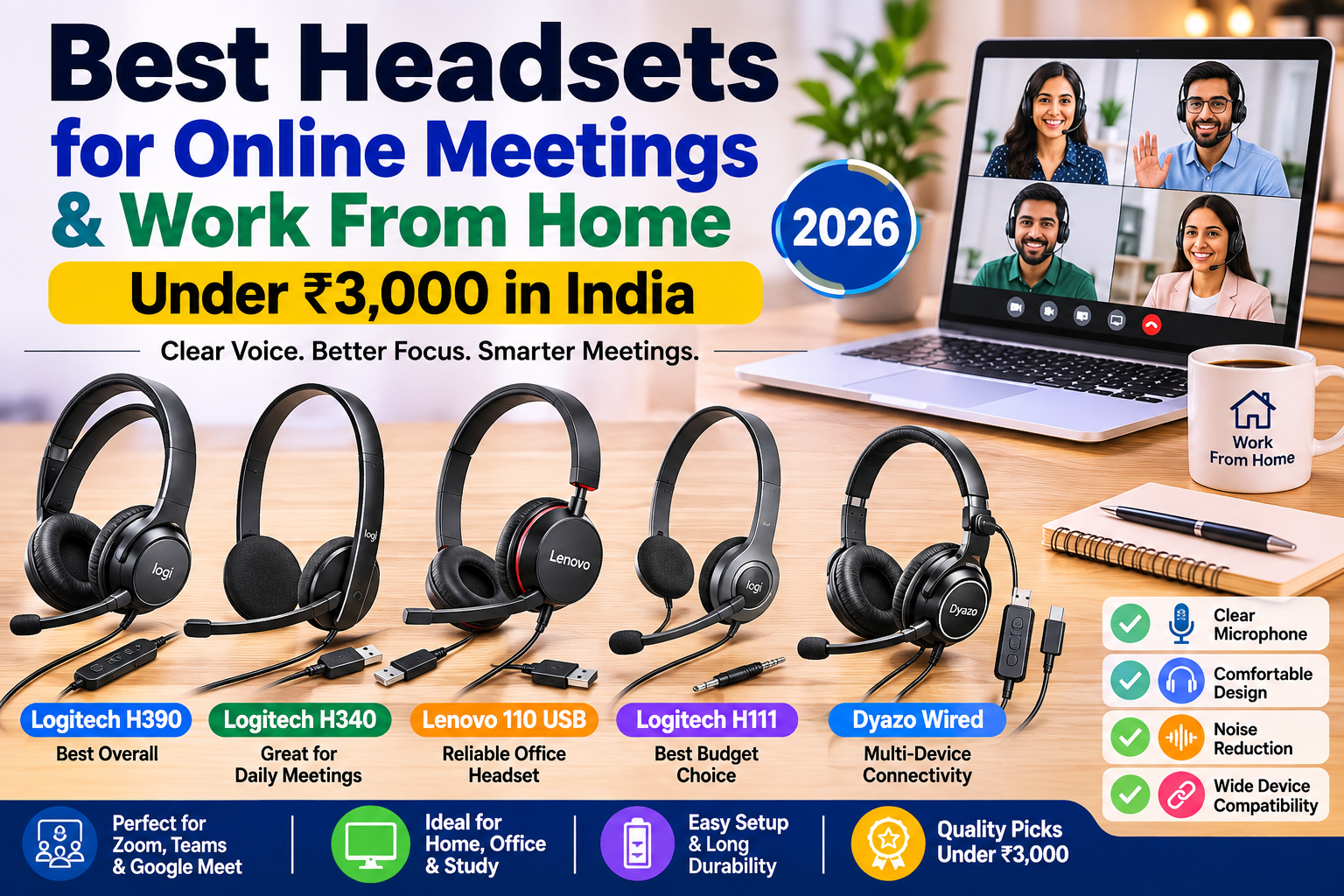
Quick Comparison: Best Headsets Under ₹3,000
| Headset | Connection | Microphone | Best For |
|---|---|---|---|
| Logitech H390 | USB | Noise-reducing mic | Best overall |
| Logitech H340 | USB-A | Noise-reducing mic | Online meetings |
| Lenovo 110 Stereo USB | USB-A | Directional mic | Office & WFH |
| Logitech H111 | 3.5 mm | Rotating mic | Budget users |
| Dyazo Wired Headset | USB / Type-C / 3.5 mm* | Noise-reduction features* | Connectivity options |
*Features can vary by model/version. Always verify the exact product listing before ordering.
1. Logitech H390 USB Headset – Best Overall
Logitech H390 Wired Headset for PC/Laptop, Stereo Headphones with Noise Cancelling Microphone, USB-A
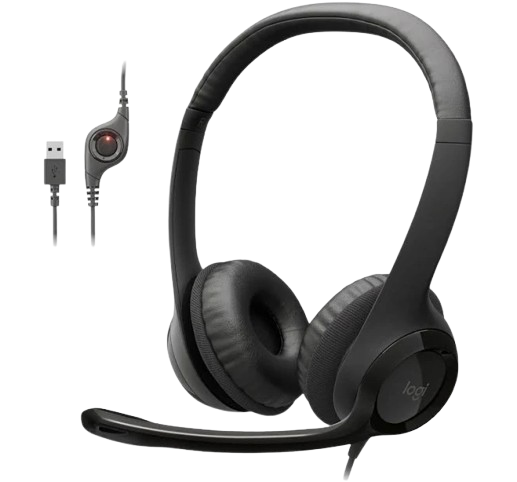
- Digital Stereo Sound: Fine-tuned drivers provide enhanced digital audio for music, calls, meetings and more
- Rotating Noise Canceling Mic: Minimizes unwanted background noise for clear conversations; the rotating boom arm can be tucked out of the way when you’re not using it.
- Handy In-line Controls: Simple in-line controls on the headset cable let you adjust the volume or mute calls without disruption.
- Plug-and-Play USB Computer Headset: Simply plug the USB-A connector into your computer and you’re ready to talk or listen without the need to install software.
- Padded Comfort: Comfortable headphones with adjustable headband features swivel-mounted, leatherette ear cushions for hours of comfort and is easy to clean.
- Move Freely With Long Cable: The 6.23 ft (1.9 m) USB A cable is just the right length to give you the freedom to stand up and stretch during long conversations.
- Works With Chromebook: H390 headphones are tested and certified, which means it meets Google’s compatibility standards and works seamlessly with your Chromebook.
- Responsible Packaging: H390 Logitech Headset uses FSC-certified paper for responsible packaging.
The Logitech H390 is one of the strongest choices in this price range for people who regularly attend online meetings.
Instead of using a traditional 3.5 mm connection, it connects directly through USB. As a result, setup is simple on compatible computers.
More importantly, Logitech equips the H390 with a noise-canceling microphone designed to reduce unwanted background noise. This can help your voice sound clearer during meetings.
The headset also includes convenient inline controls. Therefore, you can adjust the volume or mute the microphone without navigating through your computer’s settings.
Key Features
- USB plug-and-play connectivity
- Noise-canceling microphone
- 30 mm audio drivers
- Inline volume and mute controls
- Adjustable headband
- Swivel-mounted leatherette ear cushions
- Rotating microphone boom
Why We Like It
The H390 offers a useful combination of microphone quality, simple controls, comfort, and USB connectivity. Consequently, it is particularly suitable for professionals who spend a significant amount of time on video calls.
Best For
Office professionals, regular Zoom/Teams users and work-from-home employees.
Check Latest Price on Amazon
2. Logitech H340 USB Headset – Best for Everyday Online Meetings
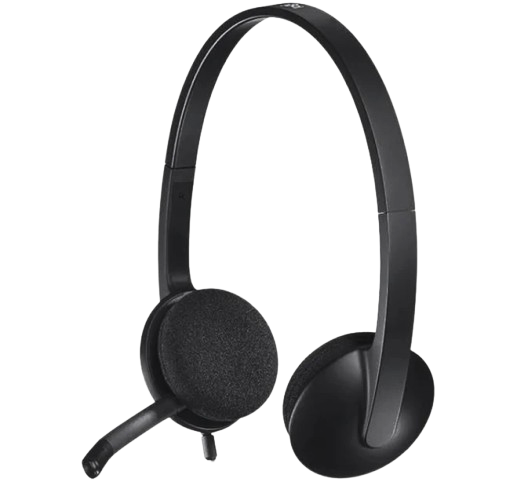
- USB Connectivity : No need to install software, simply connect the headphones via USB-A to your laptop or computer
- Digital Stereo Sound : Crystal clear audio, ideal for gaming and skyping
- Noise-Cancelling Qualities : A rotating and noise-cancelling microphone that minimizes background noise for clear calls
- Lightweight Design : Adjustable headband and mic and soft ear cups for a truly comfortable PC headset
- Flexible Microphone : Adjustable and easily positioned mic for best voice capture
For users who want straightforward USB connectivity, the Logitech H340 is another practical choice.
It uses a plug-and-play USB-A connection. Therefore, you can connect it to a compatible laptop or desktop without complicated setup.
In addition, the H340 includes a noise-canceling microphone. The microphone can be positioned for better voice capture while helping reduce distracting background sounds.
Its lightweight headband and swivel-mounted foam ear cushions are also useful for extended calls.
Key Features
- USB-A connectivity
- Plug-and-play setup
- Digital stereo audio
- Noise-canceling microphone
- Adjustable headband
- Lightweight design
- Swivel-mounted foam ear cushions
Why We Like It
The H340 keeps things simple. You don’t have to worry about Bluetooth pairing, charging batteries, or wireless interference.
Furthermore, its dedicated USB connection makes it a convenient choice for laptops and desktop computers with USB-A ports.
Best For
Online classes, office calls, webinars and everyday work-from-home meetings.
Check Latest Price on Amazon
3. Lenovo 110 Stereo USB Headset – Best for Office Work
The Lenovo 110 Stereo USB Headset is another option worth considering for home-office and professional use.
Lenovo H110 Wired Gaming Headphones Over Ear Headset
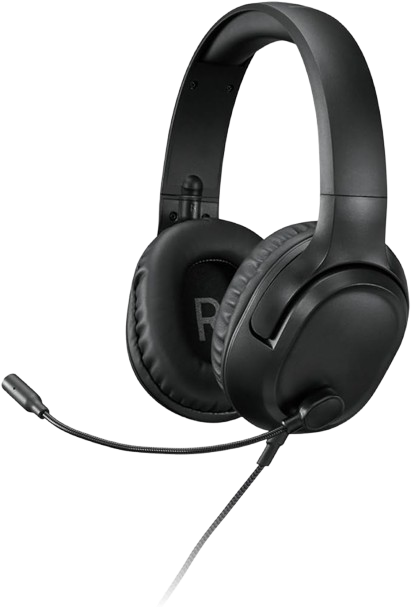
- All-Day Comfort: The H110’s light-weight design does not compromise on comfort, and is ideal for long, multi-hour gaming sessions. Its plush foam, breathable leatherette material, and lightweight design ensure optimal comfort even during extended gaming sessions
- Unmatched Audio Clarity: Immerse yourself in the details with high-end 50 mm drivers that deliver rich, realistic gaming audio that is professionally tuned to perfection. This headset guarantees an immersive gaming experience and enables seamless communication with your fellow gamers
- Omnidirectional Microphone: The incredible omnidirectional voice capturing microphone keeps you connected in real-time. And, when it’s time to end your play, the swivel-to-store design of the H110 microphone ensures easy packing and protection
- Quick-Adjust Audio: With the slide-to-mute button on the H110, you can go from live to radio silence effortlessly. And the inbuilt volume control wheel gives you the power to make on-the-fly adjustments to the speakers
- Reliable Wired Connectivity: Our headset offers a 1.8m tangle-free braided cable and 3.5mm wired connection for swift a plug-and-play attachment that always gives you a reliable connection
It uses a USB 2.0 Type-A connection and features 30 mm drivers. Additionally, Lenovo specifies a directional microphone, which makes the headset suitable for voice communication.
The headset weighs approximately 137 grams and has a 1.8-metre cable. Therefore, it should provide enough cable length for a typical desktop or laptop workspace.
Key Features
- USB 2.0 Type-A connection
- 30 mm drivers
- Directional microphone
- 20 Hz–20 kHz specified frequency range
- 1.8-metre cable
- Approximately 137 g weight
- OS-independent design
Why We Like It
Lenovo designed this model around straightforward USB connectivity and office communication. In particular, the directional microphone makes it an interesting alternative for users who spend a lot of time speaking during calls.
However, the price can vary considerably between sellers and locations. For that reason, check the latest price before purchasing.
Best For
Office employees, video meetings, remote work and regular computer-based calls.
Check Latest Price on Amazon
4. Logitech H111 Stereo Headset – Best Budget Choice
Logitech H111 Wired On Ear Headphones With Mic Black
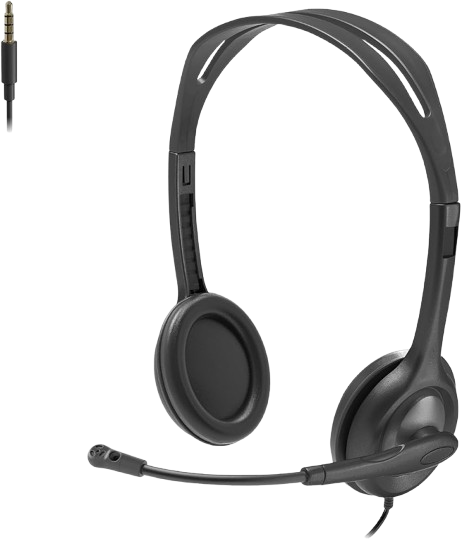
- ADJUSTABLE HEADBAND This sturdy yet lightweight stereo headset has a broad range of adjustment. Ultra-soft foam ear cushions provide hours of comfort.
- ROTATING MICROPHONE The boom mic can rotate 180° to be worn on the left or right and tucked out of the way when you’re not using it. The flexible mic can be positioned for better voice capture and background noise reduction
- MULTI DEVICE HEADSET WITH NOISE CANCELLING MIC:The simple way to start talking when using computers, smartphones and tablets. Features a standard 3.5mm audio jack and is compatible with most operating systems and platforms. Get just what you need to hear and be heard clearly.
- STEREO SOUND: Enjoy clear audio for calls, music, and games. A reliable headset for daily audio including video calls with family or colleagues.
- 3.5MM AUDIO JACK CONNECTION:Simply plug the 3.5mm jack into your computer, smartphone or tablet and you’re ready to talk.
- SYSTEM COMPATIBILTY:Computers/ smartphones/tablets Windows/Mac/Chrome OS + mor
You don’t necessarily need to spend close to ₹3,000 for basic online meetings.
The Logitech H111 is a much more affordable headset designed for voice calls, webinars and everyday communication.
Unlike the USB models above, it uses a standard 3.5 mm audio connection. Consequently, it can work with many compatible computers, smartphones and tablets that provide the appropriate headset jack.
Another useful feature is its rotating microphone. You can position the microphone for better voice pickup and move it away when it isn’t required.
Key Features
- Standard 3.5 mm connection
- Stereo sound
- Rotating microphone
- Adjustable headband
- Lightweight design
- Multi-device compatibility
Why We Like It
The biggest advantage is simplicity. If your device already has a compatible 3.5 mm headset port, the H111 provides the basic features needed for meetings without requiring a large investment.
However, users who attend several professional meetings every day may benefit from stepping up to a USB model such as the H390.
Best For
Students, occasional meetings, online classes and budget-conscious buyers.
Check Latest Price on Amazon
5. Dyazo Wired Headset – Best for Multiple Connectivity Options
Dyazo Wired Headset with Microphone
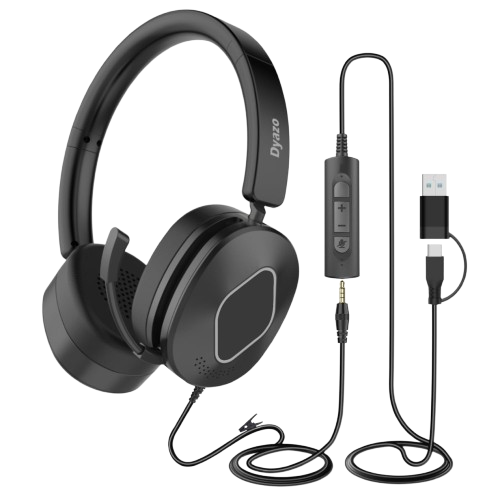
- Advanced ENC + ANC Microphone : Experience crystal-clear communication with dual Environmental Noise Cancelling and Active Noise Cancelling technology that filters out surrounding noise and enhances voice clarity. Perfect for meetings, office calls and online classes, ensuring your sound remains perfect, focused and distraction-free in any environment.
- 3-in-1 Connectivity (USB + Type-C + 3.5mm) : Designed for universal compatibility with laptops, PCs, smartphones, tablets and MacBook devices. Switch effortlessly between USB, Type-C and 3.5mm connections, ensuring stable audio performance across all supported platforms without the need for extra adapters.
- All Day Comfort with Adjustable On-Ear Design : Built with soft cushioned ear pads and a flexible adjustable headband to provide extended comfort during long working hours. Lightweight construction ensures minimal pressure, making it suitable for online classes, office calls and continuous multimedia use.
- Easy In-Line Controls & Quick Troubleshooting Support : Features intuitive in-line controls for volume adjustment, microphone mute and call operations. For troubleshooting, simply check port selection, reconnect the cable, restart audio settings or switch between USB/Type-C/3.5mm to restore optimal performance.
- Wide Compatibility for Work, Study & Entertainment : Works seamlessly with Windows, macOS, Android, iOS, tablets and major calling apps like Teams, Zoom, Meet and Skype. Perfect for work-from-home setups, school use, call centers and everyday entertainment across multiple devices.
Some users need a headset that can work with different types of devices. In that situation, selected Dyazo wired headset models are worth considering.
Certain versions offer USB, USB Type-C and 3.5 mm connectivity. As a result, they may be useful if you regularly switch between a laptop, desktop computer and other compatible devices.
Selected models also advertise environmental or active noise-reduction features for voice communication.
However, Dyazo offers several similar headset variants. Therefore, carefully check the exact connectivity, microphone features and compatibility on the product page before purchasing.
Key Features
Depending on the selected model:
- USB connectivity
- USB Type-C connectivity
- 3.5 mm connection
- Built-in microphone
- Inline controls
- On-ear design
- Noise-reduction features
Why We Like It
Flexible connectivity is the main attraction here. For users with several devices, having more than one connection option can be particularly convenient.
Best For
Users who switch between laptops, desktops and other compatible devices.
Check Latest Price on Amazon
Which Headset Should You Buy?
The right headset depends mainly on how often you attend meetings and which device you use.
Choose Logitech H390 if:
You attend online meetings frequently and want a good overall balance of microphone performance, comfort and easy controls.
Choose Logitech H340 if:
You want straightforward USB-A connectivity for regular office calls, webinars and online meetings.
Choose Lenovo 110 Stereo USB if:
You prefer a USB office headset with a directional microphone and lightweight construction.
Choose Logitech H111 if:
Your budget is limited and you mainly need a simple headset for occasional calls or online classes.
Consider a multi-connector Dyazo model if:
You regularly switch between devices and need USB, Type-C or 3.5 mm connectivity.
What to Look for When Buying a Headset for Online Meetings
A headset that sounds good for music isn’t automatically ideal for work calls. Therefore, consider the following factors before buying.
1. Microphone Quality
For online meetings, the microphone should be one of your highest priorities.
A dedicated boom microphone usually positions the mic closer to your mouth. As a result, your voice may be captured more clearly than with a laptop’s built-in microphone.
Noise-reducing microphone technology is also useful if you work around fans, traffic, conversations, or other background sounds.
2. Comfort
You may wear your headset for several hours each day. Therefore, comfort matters almost as much as sound quality.
Look for features such as:
- Adjustable headbands
- Lightweight construction
- Soft ear cushions
- Comfortable clamping pressure
If possible, take short breaks between long meetings as well.
3. USB vs 3.5 mm Connection
Both connection types have advantages.
USB Headsets
USB models are particularly convenient for laptops and desktops. In addition, they may include digital audio processing and inline call controls.
They are a good choice for a fixed work-from-home setup.
3.5 mm Headsets
A 3.5 mm headset can be more versatile with compatible devices. For example, you may be able to use the same headset with a laptop, desktop, tablet, or phone.
However, check your device first because many newer laptops and smartphones no longer provide a 3.5 mm audio jack.
4. Inline Controls
Inline controls can make meetings much easier.
For example, a mute button lets you quickly disable your microphone when necessary. Similarly, volume buttons allow you to make adjustments without opening software settings.
These features become especially useful if you attend several meetings every day.
5. Wired vs Wireless
Wireless headsets offer greater freedom of movement. However, they also require charging and usually cost more for comparable call-focused features.
Wired models, on the other hand, are simple and reliable. You can connect the headset and start your meeting without worrying about battery life.
Therefore, wired headsets often provide excellent value below ₹3,000.
Do You Need Noise Cancellation for Work From Home?
Not necessarily.
There are two different features that buyers often confuse: noise-canceling microphones and Active Noise Cancellation (ANC).
A noise-canceling or noise-reducing microphone attempts to reduce background sound picked up during your calls. Therefore, it mainly benefits the people listening to you.
ANC, by contrast, reduces outside noise that you hear through the headphones.
For online meetings, microphone clarity is generally more important than premium ANC. As a result, a good wired headset with a capable boom microphone can be more useful than inexpensive headphones that simply advertise noise cancellation.
How to Improve Your Audio Quality During Online Meetings
Buying a good headset is only part of the solution.
First, position the microphone close enough to capture your voice clearly. However, avoid placing it directly in front of your mouth because breathing sounds may become distracting.
Next, reduce unnecessary background noise. Closing windows, moving away from fans, and choosing a quieter room can help considerably.
In addition, select the correct microphone inside Zoom, Google Meet, or Microsoft Teams. Your computer may otherwise continue using its built-in microphone.
Finally, make a short test recording before an important meeting. This simple step lets you check both microphone volume and clarity.
Common Mistakes When Buying a Work-From-Home Headset
Choosing Based Only on Music Quality
A headset may produce powerful bass but still have a poor microphone. Therefore, prioritize voice quality when meetings are your main purpose.
Ignoring Connection Type
Before ordering, check whether your computer has USB-A, USB-C, or a compatible 3.5 mm audio port.
Buying Gaming Headphones Only for Their Appearance
Gaming headsets can work well for calls. However, large earcups, RGB lighting, and heavy designs aren’t necessary for ordinary office meetings.
Ignoring Comfort
Even excellent sound becomes frustrating if the headset feels uncomfortable after 30 minutes. Consequently, lightweight construction and comfortable ear cushions deserve serious consideration.
Expecting Premium ANC Below ₹3,000
Some inexpensive headsets use the words “noise cancellation” mainly to describe microphone noise reduction. Therefore, don’t automatically assume the headset includes true Active Noise Cancellation for the earphones.
Frequently Asked Questions
Which is the best headset under ₹3,000 for online meetings?
The Logitech H390 is our overall pick for regular online meetings because it combines USB connectivity, a noise-canceling microphone, inline controls and comfortable ear cushions.
Is a wired or wireless headset better for work from home?
For a fixed desk setup, a wired headset often provides better value and doesn’t require charging. However, wireless models are more convenient if you frequently move around while on calls.
Is a noise-canceling microphone important?
It can be very useful, particularly in a noisy home environment. A noise-reducing microphone can help minimize unwanted background sounds during calls.
Can I use these headsets for Zoom and Microsoft Teams?
Generally, these headsets can be used as audio input/output devices with popular meeting applications on compatible computers. Nevertheless, check the manufacturer’s compatibility information for your particular device and operating system.
Is a USB headset better than a 3.5 mm headset?
Neither is automatically better. USB headsets are convenient for computer-based meetings, whereas 3.5 mm models may offer broader compatibility with devices that still include a headset jack.
Do I need an expensive headset for work from home?
No. For most users, clear microphone performance, comfort and reliable connectivity are more important than premium audio features.
Final Verdict
A good headset can make online meetings clearer and more comfortable without costing a fortune.
For most work-from-home professionals, the Logitech H390 is our preferred overall option because of its USB connection, noise-canceling microphone and convenient inline controls.
Meanwhile, the Logitech H340 is a good alternative for straightforward USB-based meetings. The Lenovo 110 Stereo USB is also worth considering when its current price falls below ₹3,000.
For buyers on a tighter budget, the Logitech H111 offers the essential features needed for basic calls and online classes.
Ultimately, choose according to your connection type, meeting frequency and working environment. Most importantly, check the latest price and availability before purchasing, because online prices can change frequently.