
Introduction
Video meetings have become a regular part of working from home. Whether you use Zoom, Google Meet, or Microsoft Teams, a clear video feed can make your calls look more professional.
Unfortunately, many built-in laptop cameras offer only average image quality. They may struggle with poor lighting, limited viewing angles, or soft-looking video.
An external webcam can be a simple and affordable upgrade.
You don’t need to spend ₹5,000 or ₹10,000 for basic office video calls either. Several webcams available for around ₹3,000 or less provide useful features such as Full HD video, built-in microphones, privacy covers, and automatic light correction.
In this guide, we’ll look at some of the best webcams under ₹3,000 for work from home and explain what you should check before buying.
Affiliate Disclosure: This article may contain affiliate links. If you purchase through these links, Arunova.net may earn a commission at no additional cost to you. Prices and availability can change, so always check the latest price before purchasing.
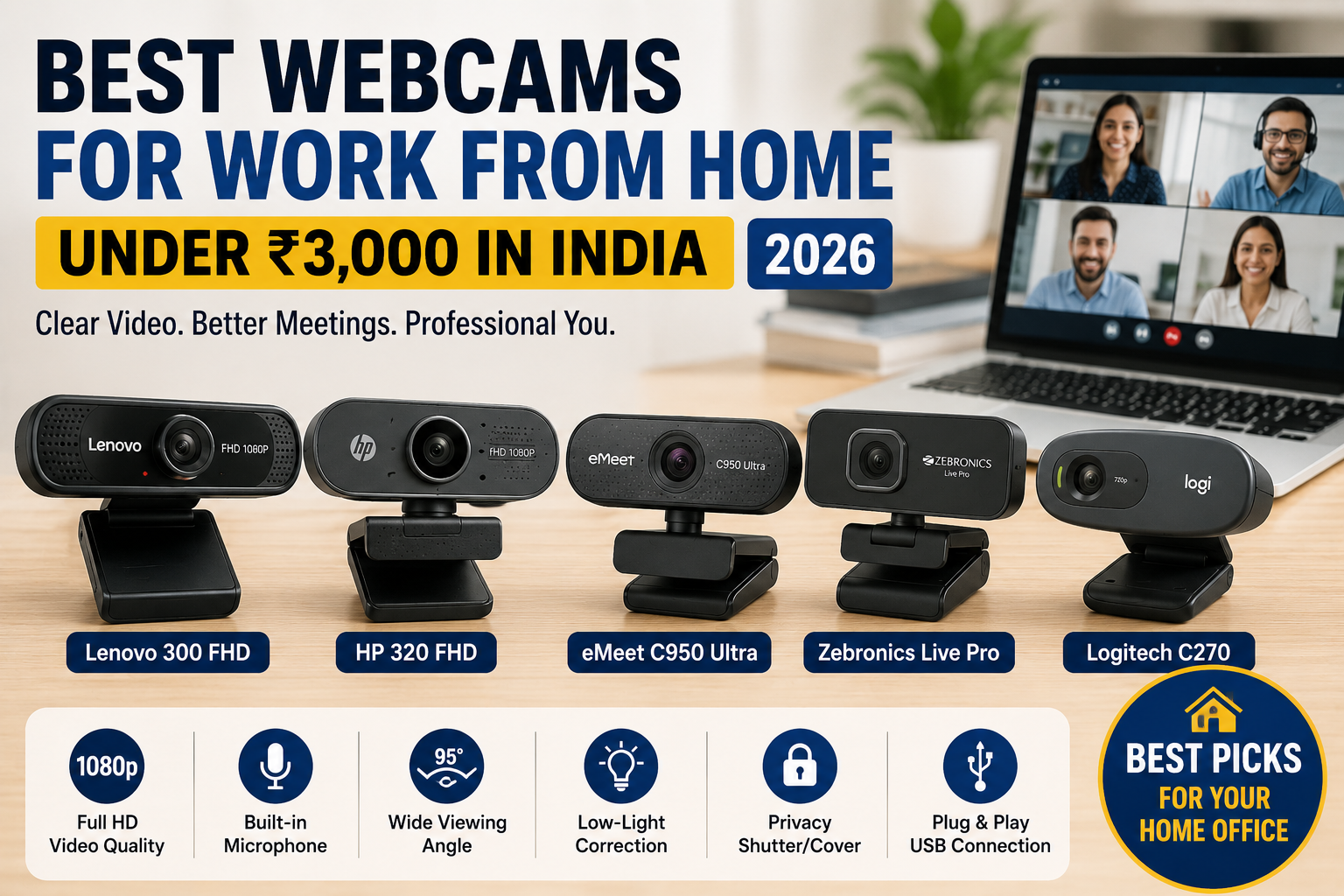
Quick Comparison
| Webcam | Resolution | Standout Feature | Best For |
|---|---|---|---|
| Lenovo 300 FHD | 1080p | Dual microphones + privacy shutter | Best overall |
| HP 320 FHD | 1080p | Auto light correction | Office meetings |
| eMeet C950 Ultra | Check current listing | Value-focused features | Budget Full HD buyers |
| Zebronics Live Pro | Check current listing | Affordable pricing | Beginners |
| Logitech C270 | 720p | Proven simple design | Basic video calls |
Important: Prices frequently change. A model that costs less than ₹3,000 today may move above that price later.
1. Lenovo 300 FHD Webcam
Best Overall for Work From Home
The Lenovo 300 FHD Webcam is one of the strongest options to consider around this budget.
It records in Full HD and provides a wide 95-degree field of view. That makes it useful for individual calls as well as situations where you want more of the room visible.
It also includes two built-in microphones.
Another useful feature is the physical privacy shutter. You can cover the camera lens when you’re not using it.
Key Features
- Full HD resolution
- 95-degree field of view
- Two built-in microphones
- Privacy shutter
- Pan and tilt adjustment
- USB-A connection
- Plug-and-play style connectivity
Pros
- Full HD image
- Wide field of view
- Dual microphones
- Physical privacy protection
- Suitable for professional meetings
Cons
- Wired connection
- Wide viewing angle may show more background than some users want
Best For
- Office professionals
- Teachers
- Freelancers
- Remote workers
- Online meetings
Arunova Verdict
Best Overall Under ₹3,000
2. HP 320 FHD Webcam
Best for Professional Video Meetings
The HP 320 FHD Webcam is another strong choice for remote workers.
It offers Full HD 1080p video and includes automatic image and light correction. Therefore, it can be particularly useful if the lighting in your room isn’t perfect.
The webcam also includes an integrated microphone.
Its 66-degree field of view is narrower than the Lenovo model. However, that can actually be an advantage for individual office calls because less of your room appears in the frame.
Key Features
- Full HD 1080p
- Integrated microphone
- Automatic light correction
- 66-degree field of view
- 360-degree swivel
- Tripod support
- Privacy lens cover
- USB-A connection
Pros
- Clear Full HD video
- Automatic light adjustment
- Good framing for individual calls
- Privacy cover
- Flexible mounting
Cons
- Availability may vary
- USB-A only
- Not intended for advanced content production
Best For
- Zoom meetings
- Microsoft Teams
- Google Meet
- Online interviews
- Remote office work
Arunova Verdict
Best for Office Video Calls
3. eMeet C950 Ultra
Best Value Alternative
The eMeet C950 Ultra is worth comparing when it falls comfortably below the ₹3,000 limit.
Budget webcams have improved considerably, and models in this category can provide useful features for video calls without the premium price of high-end streaming cameras.
Before purchasing, check the exact current specifications because listings and model variants can change.
Check Before Buying
Confirm:
- Video resolution
- Frame rate
- Microphone
- Privacy cover
- Autofocus or fixed focus
- Field of view
- USB compatibility
Pros
- Competitive pricing
- Designed for video conferencing
- Potentially strong value
- Suitable for home-office setups
Cons
- Verify exact model specifications
- After-sales support may differ from larger PC brands
Best For
- Budget-conscious professionals
- Students
- Online classes
- General home use
Arunova Verdict
Best Value Alternative
4. Zebronics Live Pro
Best Affordable Webcam for Beginners
If you’re building your first home-office setup, you may not need an expensive webcam.
The Zebronics Live Pro sits in the affordable segment and can be worth considering for basic video meetings and online learning.
It’s especially relevant for users who simply want something better than an old or poorly positioned built-in laptop camera.
Best For
- Students
- Beginners
- Occasional Zoom calls
- Online classes
- Basic work-from-home meetings
Pros
- Affordable
- Accessible Indian-market brand
- Suitable for basic use
- Lower initial investment
Cons
- Compare image quality with more expensive Full HD models
- Check the exact current specifications before ordering
- Serious streamers may want a more advanced camera
Arunova Verdict
Best Budget Pick
5. Logitech C270
Best for Simple and Reliable Video Calling
The Logitech C270 has been a popular entry-level webcam for years.
However, there is one important point to understand.
The C270 is primarily a 720p HD webcam, whereas several newer budget competitors now offer 1080p.
So why consider it?
Its appeal lies in simplicity. If you mainly need a webcam for basic office meetings, online classes, or family video calls, 720p may still be enough.
Advantages
- Simple setup
- Compact design
- Well-established webcam line
- Suitable for basic meetings
- Often available at affordable prices
Disadvantages
- 720p rather than Full HD
- Less attractive if similarly priced 1080p models are available
- Not ideal for users prioritizing maximum detail
Best For
- Basic office meetings
- Students
- Occasional video calls
- Users who value simplicity
Arunova Verdict
Best Basic Webcam
Which Webcam Should You Buy?
Your ideal webcam depends on how you plan to use it.
Choose Lenovo 300 FHD If:
You want a strong all-round option with Full HD video, dual microphones, a wide field of view, and a privacy shutter.
Choose HP 320 FHD If:
Your main priority is professional video meetings and you want automatic light correction with tighter framing.
Consider eMeet If:
You want to maximize features for your budget and find a well-priced model with the specifications you need.
Consider Zebronics If:
You’re a beginner and want an inexpensive webcam for basic meetings or online classes.
Choose Logitech C270 If:
You only need straightforward HD video calling and don’t require 1080p resolution.
What to Look for When Buying a Webcam Under ₹3,000
Price alone shouldn’t decide which webcam you buy.
Consider these features first.
1. Video Resolution
For 2026, I recommend looking for 1080p Full HD when your budget allows it.
1080p generally provides more detail than 720p.
However, resolution isn’t everything. Lighting, lens quality, image processing, and internet connection also affect how you look during a call.
2. Frame Rate
Many affordable webcams operate at around 30 frames per second.
For normal office meetings, 1080p at 30fps is usually sufficient.
You don’t necessarily need 60fps for Zoom or Teams meetings.
3. Microphone Quality
Most budget webcams include a built-in microphone.
This is convenient, but don’t assume that every webcam microphone will sound excellent.
If you attend important meetings regularly, a dedicated headset may provide clearer voice quality.
4. Autofocus vs Fixed Focus
Autofocus automatically adjusts when your distance from the camera changes.
Fixed-focus webcams work best when you remain within their intended distance range.
For ordinary desk-based office calls, either can work well.
5. Field of View
Field of view determines how much of your surroundings appear in the image.
A narrower field of view works well for individual calls.
A wider field of view is useful when:
- Several people need to appear
- You use a larger meeting room
- You want more background visible
For home offices, wider isn’t automatically better.
6. Privacy Shutter
A physical privacy shutter is a small but valuable feature.
It lets you physically cover the camera lens when you’re not using it.
For work-from-home users, I consider this a worthwhile feature.
7. Low-Light Performance
A webcam cannot completely compensate for poor lighting.
Even an expensive webcam will look better with good lighting.
Place yourself facing a window or light source when possible.
Avoid sitting with a bright window directly behind you.
1080p vs 720p: Which Should You Choose?
If two webcams are similarly priced and everything else is comparable, I would generally choose 1080p.
Full HD gives you more image detail and provides greater flexibility for future use.
However, don’t reject a good 720p webcam solely because of resolution.
For ordinary video conferencing, factors such as:
- Lighting
- Microphone quality
- Reliable drivers
- Camera positioning
- Internet connection
can matter just as much.
Do You Need a 4K Webcam for Work From Home?
For most people, no.
A 4K webcam can be useful for professional content creation, recording, streaming, or situations that require high image detail.
However, standard work-from-home meetings rarely justify the additional expense.
For most beginners, a good 1080p webcam offers the best balance between quality and cost.
How to Make Any Webcam Look Better
You don’t always need a more expensive camera.
Try these simple improvements first:
- Place the webcam at eye level.
- Face a window or soft light.
- Avoid strong light behind you.
- Keep the camera lens clean.
- Use a simple background.
- Sit at a comfortable distance.
- Check video settings before meetings.
- Use a headset if microphone quality is poor.
Good lighting can sometimes make a bigger difference than upgrading the webcam itself.
Common Webcam Buying Mistakes
Buying Based Only on Megapixels
More megapixels don’t automatically mean better video.
Lens quality, image processing, lighting, and sensor performance also matter.
Ignoring the Microphone
If you don’t own a headset, microphone quality becomes important.
Choosing an Extremely Wide Camera
A wide field of view may show unwanted parts of your room.
Ignoring Privacy
If possible, choose a webcam with a physical lens cover.
Paying for Features You Don’t Need
For office meetings, you probably don’t need advanced streaming features or 4K recording.
Frequently Asked Questions
Which is the best webcam under ₹3,000?
For work-from-home use, the Lenovo 300 FHD is a strong option when available below ₹3,000 because it combines Full HD video, dual microphones, a privacy shutter, and a wide field of view.
Is 1080p necessary for Zoom meetings?
It isn’t strictly necessary. However, 1080p gives you better image detail and is now available on many affordable webcams.
Is a webcam better than a laptop camera?
It depends on your laptop. Many external webcams offer better positioning, wider viewing angles, privacy features, or improved video quality compared with older laptop cameras.
Do I need a webcam with a microphone?
It’s convenient, but not essential. If you already use a good headset, the headset microphone may provide better voice quality.
Is autofocus necessary?
Not for everyone. If you sit at a fixed distance during meetings, a fixed-focus webcam can work perfectly well.
Can I use these webcams for online teaching?
Yes. A Full HD webcam is particularly useful for teachers who conduct online classes, demonstrations, or presentations.
Can I use a webcam for YouTube?
Yes, although creators who become serious about video production may eventually want better lighting, audio, and a higher-end camera.
Final Verdict
You don’t need an expensive webcam to improve your work-from-home setup.
For most remote workers, 1080p resolution, a reliable USB connection, a decent microphone, and good lighting are more important than premium features.
The Lenovo 300 FHD is my strongest all-round choice when its price stays below ₹3,000.
The HP 320 FHD is also attractive for professional calls, especially because of its automatic light correction and privacy features.
Meanwhile, budget alternatives from brands such as Zebronics and eMeet can make sense for beginners.
Finally, don’t overlook the Logitech C270 if you only need straightforward video calling and find it at a good price.
Whichever webcam you choose, check the latest price, exact specifications, warranty, seller, and current customer feedback before ordering.